


Lorem ipsum dolor sit amet, consectetur adipiscing elit. Ut elit tellus, luctus nec ullamcorper mattis, pulvinar dapibus leo.
Multi-Factor Authentication
Beginning December 2, 2025, Bluestone Federal Credit Union members will be required to use multi-factor authentication (MFA) when logging into their online account. This is sometimes referred to as two-factor authentication.
How Does MFA Work?
MFA is a security process that requires users to validate their identity using two or more methods. In our case, these will be your online banking password and an email or text message verification code. You will need to complete this process for each device you use to log into It’sMe247. This includes computers, ipads, phones and similar devices.
How Does MFA Benefit You?
Stronger Security
Even if your password is stolen, MFA helps block unauthorized access.
Simple & Quick Setup
Choose from easy-to-use authentication methods.
Peace of Mind
Added protection against phishing and cyber threats.
What Do You Need to Do to Prepare for MFA?
Log into your ItsMe247 account before December 2, 2025, to verify that your mobile phone number and email are correct. It is important this information is accurate, and remains accurate, so you can access your account. Remove any invalid phone numbers or email addresses.
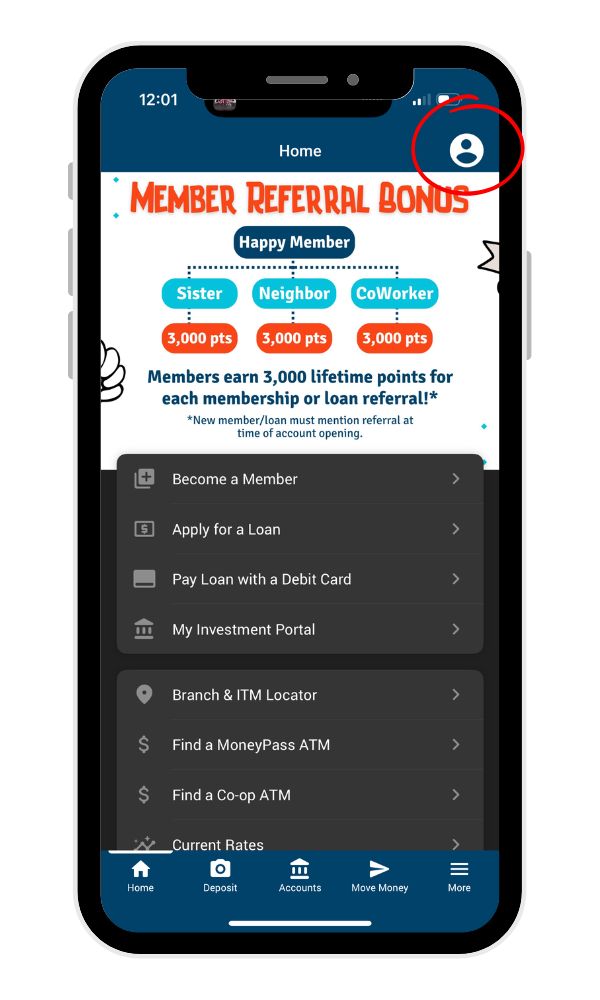
In the top, right area of your screen, click the person icon (or you may see your photo).
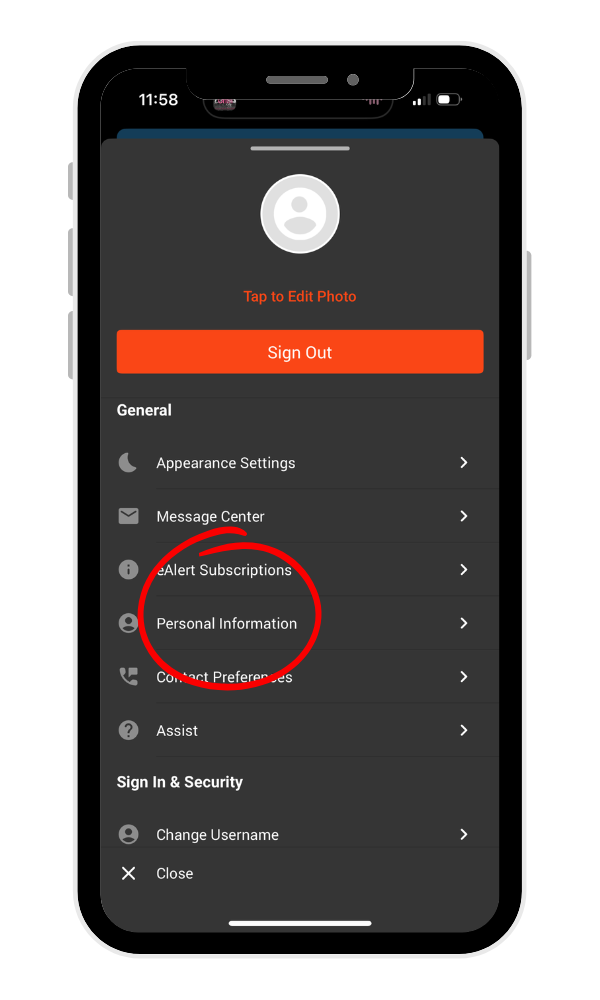
Click on personal information to review your details.
How to update your information:
- Click the edit personal information button
- Update your details
- Click the update button at the bottom
What is the MFA Process for Joint Account Holders?
Joint account holders can use mobile phone numbers or email to receive verification codes, however you may be impacted differently when selecting the email option.
Any mobile phone number listed on your account can receive a text message with a verification code. Before December 2 verify that mobile phone numbers are correct for all account holders and remove any phone numbers that are no longer being used.
You can also send a verification code to the email listed on the account. If using this verification method, it is important that any account holder has access to the email account to retrieve the code. Currently, only one email can be listed on a joint account.
How Does MFA Work?
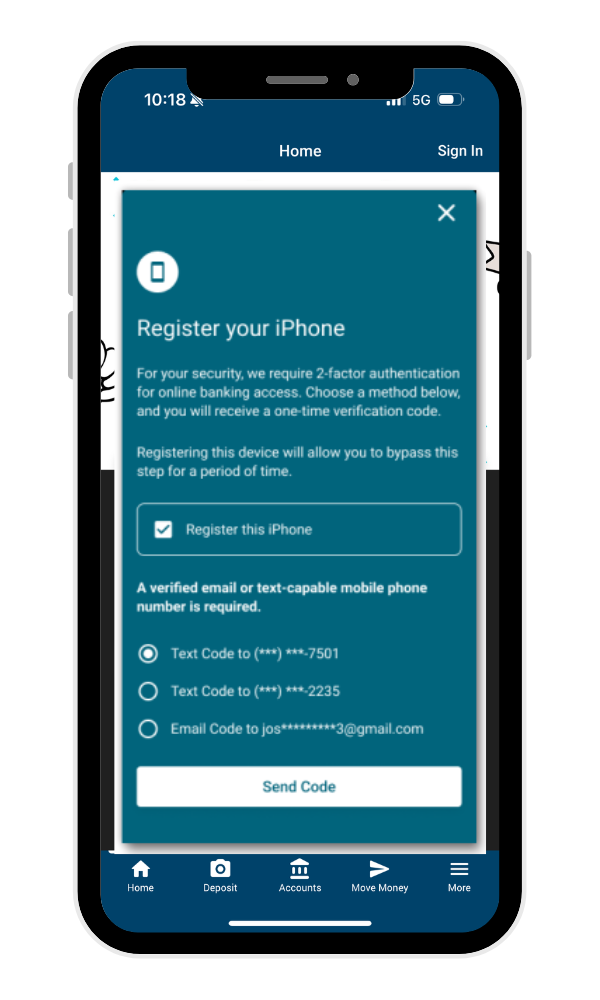
Starting December 2, 2025, login as usual. You will see a screen similar to the one shown, directing you to register your device.
- Check the box to register your device (if unchecked).
- Choose how you would like to receive your verification code – text or email, then click, Send Code.
- Enter the code you receive on the following screen.
What do the verification screens look like?
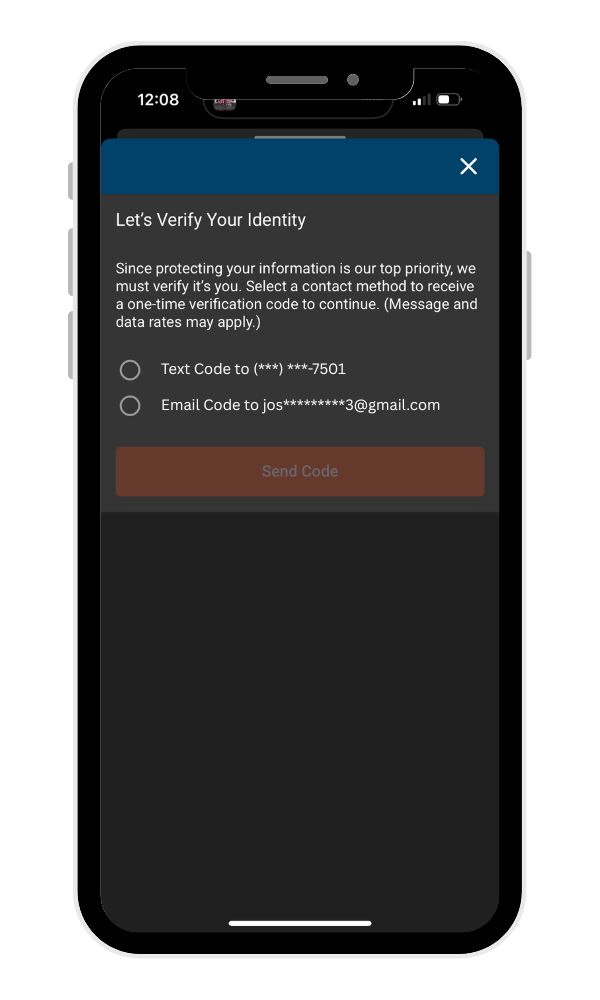
Select a phone number or email for the verification code to be sent. it may take a few moment for the code to arrive.
After retreiving the verification code from your text of email, input it open line shown in the screen below.
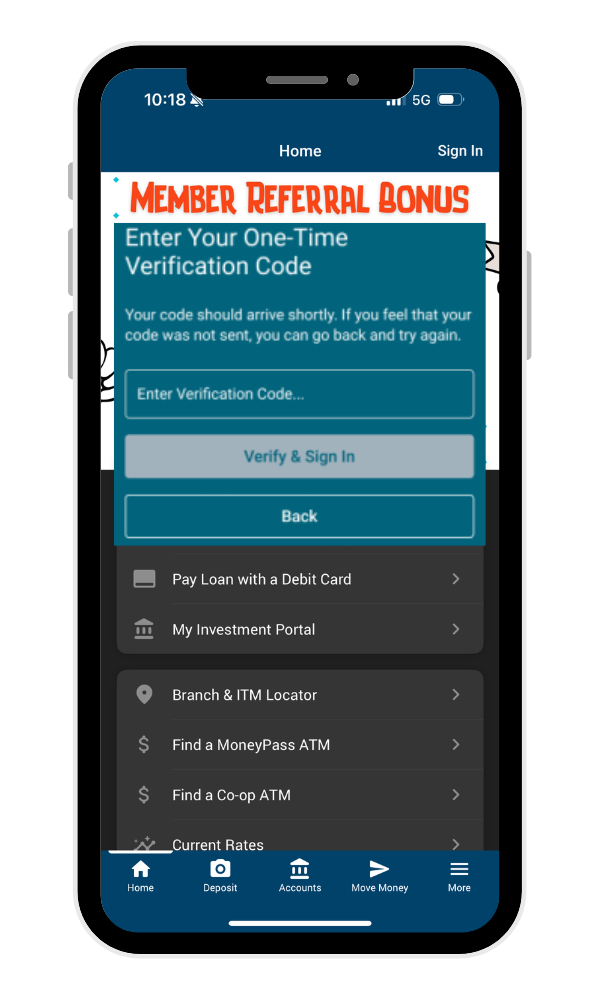
The MFA process takes only a few moments and enhances the security of your account. Please see our FAQs below for more details.
Frequently Asked Questions
Multi-factor authentication (MFA) is a security process that requires users to validate their identity using two or more methods. In our case, these will be your online banking password and an email or text message verification code.
Please ensure your contact information is, and remains, current so that you are able to receive a verification code and retain access to your accounts. Bluestone Federal Credit Union is requiring MFA to enhance security, protect your data, and prevent unauthorized access to your accounts.
In order to complete MFA, you will need to access a verification code through your current mobile phone number or email. It is important that this contact information is accurate, and stays accurate, so you can receive the verification codes after MFA launches on December 2, 2025.
Where can you access your account information:
- In the top, right area of your screen, click the person icon or your photo
- Click on personal information to review your details
How to update your information:
- Click the edit personal information button
- Update your details
- Click the update button at the bottom
- In the top, right area of your screen, click the person icon or your photo
- Click on personal information to review your details
How to update your information:
- Click the edit personal information button
- Update your details
- Click the update button at the bottom
Account holders can use a mobile phone number or email to receive verification codes, however you may be impacted differently when selecting the email option.
Any mobile phone number listed in your account can receive a text message with a verification code. Before December 2, 2025, verify that mobile phone numbers are correct for all account holders and remove any phone numbers that are no longer being used.
You can also send a verification code to the email listed on the account. If using email, it is important that any account holder wishing to use this method has access to the email account to retrieve the code. Currently, only one email can be listed on a joint account.
Where can you access your account information:
- In the top, right area of your screen, click the person icon or your photo
- Click on personal information to review your details
How to update your information:
- Click the edit personal information button
- Update your details
- Click the update button at the bottom
No, once your have registered your device, you will not have to re-verify your device for 30 days.
At the time that MFA launches for Bluestone Federal Credit Union members, Plaid is the only aggregator that has direct integration with ItsMe247. Most other aggregators work by inputting login information as if they are the member using a “screen-scrap” technique. Since those aggregators cannot receive and submit a one-time code, it cannot complete the MFA process.
Yes. If you need to reset your password, a confirmation code will be sent by text or email. Enter this code when prompted on the screen.
Call our Member Service Center at (605) 367-7070 during regular business hours.